How do I use Google Ads for my business?
If you want to reach people who are actively searching for your products or services, Google Ads can be a useful way to promote your business online. Instead of waiting for people to discover your website naturally, you can create ads that appear when potential customers search for relevant terms on Google.
But simply creating an ad does not guarantee results. You need to choose the right audience, keywords, budget, and landing page.
So, how do I use Google Ads for my business? Let’s go through the process step by step.
What Is Google Ads?
Google Ads is Google’s online advertising platform. Businesses can create advertisements that may appear on Google Search and other Google properties, depending on the campaign type.
For example, if you run a plumbing business, you might create an ad targeting searches such as:
- Emergency plumber near me
- Plumber in my area
- Plumbing repair service
- Bathroom pipe repair
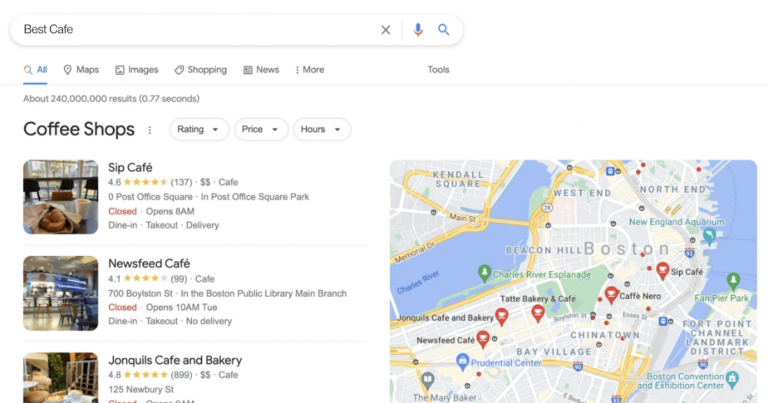
When someone searches for a relevant term, your ad may appear among the search results.
You generally pay when someone interacts with your ad, depending on the campaign and bidding setup you choose.
1. Create a Google Ads Account
Start by creating or signing in to your Google Ads account.
You’ll need basic information about your business and payment details. Before launching a campaign, make sure you understand the account settings, billing, and campaign objectives.
2. Choose Your Advertising Goal
Google Ads allows you to create campaigns for different business objectives.
Your goal might be to:
- Get phone calls
- Receive website enquiries
- Generate leads
- Increase online sales
- Get more visits to your website
- Promote a specific service
Choose a goal that matches what you actually want customers to do.
For example, a local service business may focus more on calls and enquiries than simply getting website visitors.
3. Choose the Right Campaign Type
Google Ads offers different campaign types for different advertising needs.
For a business targeting people who are already searching for a service, Search campaigns can be a practical starting point.
Other campaign types can be useful for different purposes, such as reaching people across Google’s advertising networks, promoting products, or increasing awareness.
The right choice depends on your business, customers, and advertising objective.
4. Select Relevant Keywords
Keywords are an important part of Google Search advertising.
Think about what your potential customers would type into Google when they need your product or service.
For example, a local electrician might consider keywords such as:
- Electrician near me
- Emergency electrician
- Electrical repair service
- Electrician in [city]
Avoid choosing keywords simply because they have high search volume. A keyword should also be relevant to what your business actually offers.
5. Understand Search Intent
Not every search represents the same level of buying interest.
For example:
“What is SEO?” is mainly an informational search.
“SEO company near me” may show stronger commercial intent.
Understanding search intent helps you create ads that match what people are actually looking for.
6. Set Your Location Targeting
If your business serves a specific area, location targeting is very important.
You can target locations based on where you want to reach customers. Depending on your business, this could be:
- A city
- Several cities
- A region
- A larger service area
A local business usually doesn’t need to advertise everywhere. Focusing your budget on areas where you can actually serve customers can make your campaigns more relevant.
7. Set a Daily Budget
Decide how much you’re comfortable spending on advertising.
Start with a budget that your business can sustain rather than spending a large amount immediately.
Your actual costs can vary depending on competition, keywords, location, industry, bidding, and other factors.
It’s also important to distinguish between your daily budget and the actual cost of individual clicks or conversions.
8. Write a Useful Ad
Your advertisement should quickly explain why someone should consider your business.
A good search ad usually communicates:
- What you offer
- A relevant benefit
- Your service area, when useful
- A clear next step
For example, instead of writing a vague advertisement, make it directly relevant to the search.
If someone searches for emergency plumbing, an ad focused on emergency plumbing services is generally more relevant than a generic business advertisement.
9. Create a Relevant Landing Page
Don’t send every visitor to your homepage automatically.
If your advertisement promotes a specific service, the landing page should clearly explain that service.
A useful landing page should include:
- Clear information about the service
- Contact details
- A visible call-to-action
- Easy navigation
- Mobile-friendly design
- Relevant and trustworthy content
The experience after someone clicks your ad can have a major effect on whether that visitor becomes a customer.
10. Add Conversion Tracking
One of the most important parts of Google Ads is understanding what happens after someone clicks.
You may want to track actions such as:
- Form submissions
- Phone calls
- Purchases
- Appointment requests
- Important button clicks
Conversion tracking helps you understand which campaigns and keywords are generating meaningful business actions rather than just traffic.
11. Monitor Your Campaign
Launching a campaign is only the beginning.
Regularly check metrics such as:
- Clicks
- Impressions
- Click-through rate
- Cost per click
- Conversions
- Cost per conversion
- Search terms
- Conversion value, where applicable
Look for patterns rather than judging a campaign based on a small amount of data.
12. Review Your Search Terms
Your keyword list and the searches people actually use aren’t always identical.
The search terms report can help you identify searches that triggered your ads.
You may discover:
- Highly relevant searches worth targeting
- Irrelevant searches that waste budget
- New keyword ideas
- Searches that should be excluded
Adding appropriate negative keywords can help prevent ads from appearing for searches that aren’t relevant to your business.
13. Test and Improve Your Ads
Don’t assume your first advertisement will be your best one.
You can test different:
- Headlines
- Descriptions
- Calls to action
- Landing pages
- Keyword groups
- Offers
Make changes based on actual campaign data rather than changing everything at once.
Common Google Ads Mistakes to Avoid
Businesses often make a few common mistakes when starting Google Ads:
- Targeting overly broad keywords
- Advertising in locations they don’t serve
- Sending all traffic to an unrelated page
- Not tracking conversions
- Ignoring search terms
- Using a budget without monitoring results
- Expecting immediate profitable results
- Making frequent changes without enough data
- Focusing only on clicks instead of business outcomes
Avoiding these mistakes can make your advertising easier to manage and evaluate.
How Much Does Google Ads Cost?
There isn’t one fixed price for Google Ads.
The cost can vary significantly depending on your industry, competition, location, keywords, campaign settings, and customer demand.
Some keywords may cost relatively little per click, while highly competitive commercial searches can cost considerably more.
Instead of asking only, “How much does a click cost?”, consider the larger question: How much does it cost to generate a qualified customer?
That gives you a more useful way to evaluate advertising performance.
Is Google Ads Good for Small Businesses?
Google Ads can be used by businesses of different sizes, including small and local businesses.
The key is controlling your targeting and budget and focusing on searches that are genuinely relevant to your business.
A small business doesn’t necessarily need to compete for every possible keyword. A focused campaign can concentrate spending on products, services, and locations that matter most.
Final Thoughts
If you’re wondering how to use Google Ads for your business, start with a clear goal, understand what your customers search for, choose relevant keywords, target the right locations, create useful ads, and send visitors to relevant landing pages.
Most importantly, track what happens after the click. Google Ads works best when you treat it as an ongoing process of testing, measuring, and improving rather than simply turning on advertisements and waiting for customers.